

 |


| Quantity: | |
|---|---|
IPS1004
Play Standard
"Magic Brush" is a multimedia interactive entertainment system designed to foster creativity and scientific thinking in preschool-aged children. Through interaction with the large touch table, children can engage in scenario generation on a large projected screen. This product leverages computer vision, multi-screen interaction, and AR technology.
Magic Brush Interactive Sketch-book
Operation Steps
Step1:Choose a figure
Click to open the art board, select a model in the model library, and click the model's picture


Step2:Paint the figure
Choose a different gameplay (Doodling / Finding/ Puzzle) and click the gameplay to enter the corresponding game and complete the task according to the corresponding rules.

Step 3: Throw to the wall
After painting, choose “OK” to cut the painted character,then throw it to the wall.

Choose Brush Shape and Size

Other Games

18+ Theme-Version3.0

Touch Table Outlook

Hardware Specification-Set A

Hardware Specification-Set B

Hardware Specification-Set C
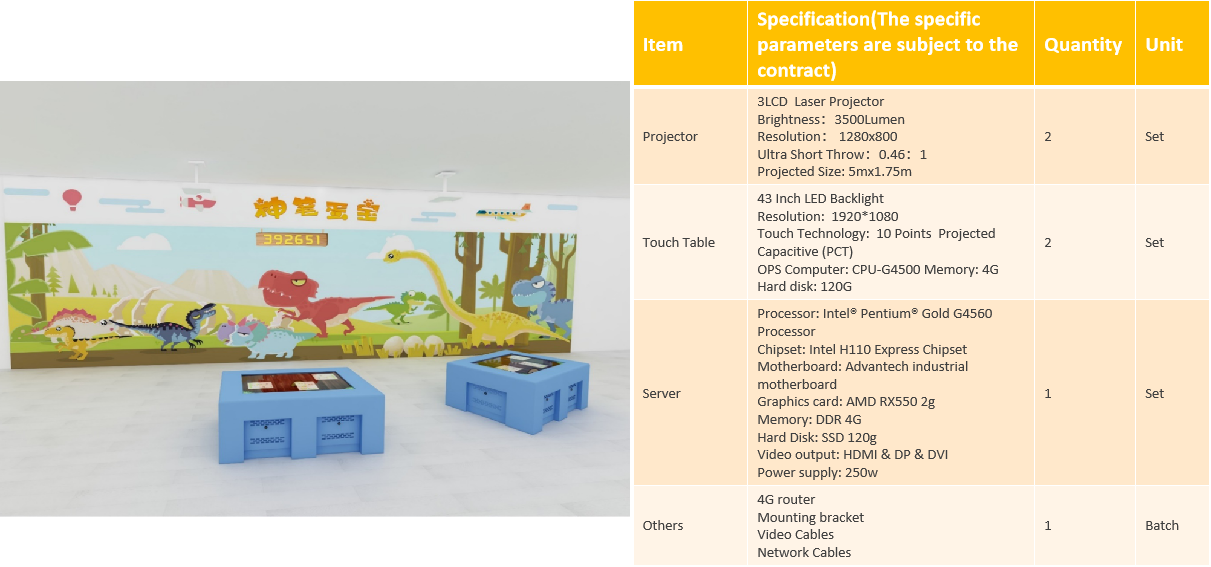
Specification

According to the principle of projection, the further the projector is installed , the bigger the projection size can be achieved.
The requirement of illumination intensity:Recommended aliment light level<200lux.
Optimum light level <100lux
Suggestion:The material of projection background is suggested to be white and anti-reflective.
Note:Rated voltage is 220V / 110V(US)
Compare between Touch Table Version and Scanner Version

Project Reference


"Magic Brush" is a multimedia interactive entertainment system designed to foster creativity and scientific thinking in preschool-aged children. Through interaction with the large touch table, children can engage in scenario generation on a large projected screen. This product leverages computer vision, multi-screen interaction, and AR technology.
Magic Brush Interactive Sketch-book
Operation Steps
Step1:Choose a figure
Click to open the art board, select a model in the model library, and click the model's picture
Step2:Paint the figure
Choose a different gameplay (Doodling / Finding/ Puzzle) and click the gameplay to enter the corresponding game and complete the task according to the corresponding rules.
Step 3: Throw to the wall
After painting, choose “OK” to cut the painted character,then throw it to the wall.
Choose Brush Shape and Size
Other Games
18+ Theme-Version3.0
Touch Table Outlook
Hardware Specification-Set A
Hardware Specification-Set B
Hardware Specification-Set C
Specification
According to the principle of projection, the further the projector is installed , the bigger the projection size can be achieved.
The requirement of illumination intensity:Recommended aliment light level<200lux.
Optimum light level <100lux
Suggestion:The material of projection background is suggested to be white and anti-reflective.
Note:Rated voltage is 220V / 110V(US)
Compare between Touch Table Version and Scanner Version
Project Reference


 +971 58 542 5499